Money app: Winter Results

Winter is over, and I thought today is a good day to outline a few things that Money users could notice, summarize some changes that we have, and update everyone about what we are doing. Actually I always give quick updates through Twitter, so please follow me and ask quick questions. I am ready to give answers, and if you are a Money user, there is no better way to stay connected.

Successes:

On Christmas time Money app hit the first position in over 20 countries, and in some App Stores it even was top paid overall. Also, Money was reviewed on MacMagazine website in Brazil. Another Brazilian website iPhoneApps also favored Money. On December 30 Money got a review from iPhoneTunes.net. It was named among the best applications on BibleMoneyMatters.com weblog (BibleMoneyMatters.com is nominated as the best personal finance blogs by the Plutus Awards, which can be compared to the Oscars of the personal finance blog world). Those are the websites that I’ve become aware of, and if you come over any others, please tweet me because I keep those records.

(Credit: Apple)

Here is the list of important changes that Money users could see:

1. We have started a new website, which is iBearMoney.com, dedicated to the Money app only. This generally signifies a major change that we have in iBear. As developers for iPhones we have been running several projects, with Money being the most important one. All the projects were listed on our initial website iBearSoft.com. Now we have decided to put even more emphasis on developing Money, and to help more people talk to each other and see everything related to Money in one place. This website iBearMoney.com is the way to achieve it.

2. We have changed and improved Support significantly. First of all, we’ve started Forums. I am going to write a separate post about Forums. Why have we started them? Several times it has happened that users could not get our answers due to their spam filters, so we have decided that answers should become transparent. There is another advantage of Forums: if you have a question, you may first search for similar topics and get an instant answer. So I suppose it helps a lot.


3. The number of Twitter followers have grown to 550 people from only a few. Twitter is a great tool, and I personally answer every message as soon as I see it. This is why I encourage you to follow me. I check Twitter day and night, from my computer and form the iPhone, and whenever I see a message I answer to my best knowledge.

4. We have created a Desktop client for iBearMoney to simplify data input to the iPhone app, but had to postpone the announced release. I will immediately tweet when we release it.

5. We’ve started playing with the iPad development kit, and have taken several steps to adjust Money for the iPad. We are not yet coding it, but it was interesting to see what it can be. There is an opinion poll at the Forums about this, so please leave your comment. It will help us to understand better what customers expect.


6. Starting from version 4.0 Money app has a new design that complies with the best Apple’s idea of combining elegant design and high productivity. Also Money 4.0 was a huge milestone because we’ve change a lot in the application itself. For example, we’ve change the Budget section a lot, added Planned and Automatic transactions, and started working with more translators who are all native speakers. Money is now translated into 17 languages overall.


If you have an iPhone and care about your personal finances, welcome to try the Free version of Money. Or buy the Money app from the App Store right away following this link.

Posted in Uncategorized | Leave a comment

iPad Apps: a few Developer’s Notes

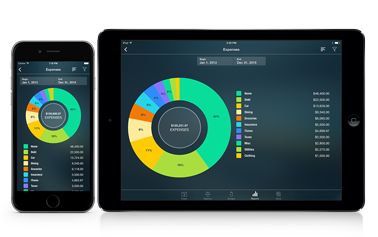
The iPad has been announced, and though it is yet not on sale, Apple has already released a development kit, which we can use to “play with” and see how apps are going to look. The development kit is yet only preliminary, but we’ve already tried to distinguish its features, and here are several screenshot of how the Money app can look on the iPad.

By the way, if you are a Money app user, or if you are simply interested in personal finance management, please follow me on Twitter for quick updates and Q&A’s. I like Twitter because it keeps everything short and clear, so please subscribe.

1. Applications on the iPad can run in an iPhone mode and in a mode native to the iPad. The iPhone mode has 2 sizes: the iPhone screen size, and the iPhone screen size x 2.


2. In the iPad mode we can make a new screen appear as a popup next to the current screen, which is not possible on the iPhone.


3. This is no surprise, but still: the iPad supports rotation and the iPad has a beautiful MacBook style keyboard, which gets even bigger in the landscape position.


It is still not obvious for our company that it makes sense to make the Money app work on the iPad. It makes a lot of sense to have Money on the iPhone because you always carry your iPhone with you, and have instant access to your financial data whenever you need it. Would you buy the Money app for the iPad? Please answer my question in the forum here.

If you don’t have the Money app, I recommend you to buy the iPhone version of Money today from the App Store.

Posted in Application | Tagged , | 1 Comment

Desktop Client: release delayed, learn why

For all the iBearMoney users and people who are interested in financial software for the iPhones and beyond the iPhones, I have to say that the announced release of the Desktop Client has to be delayed.

This blog post is meant to keep you updated. If you still do not follow me on Twitter, please subscribe as this will help you to know the latest news and events related to iBearMoney, a top finance app for the iPhones. That’s the good thing about Twitter: the ability to get quick updates when there is little time to read more.

In my blog post dated January 25 I said that the Client was supposed to be available “next week”, which has just passed. I am really sorry for the fact that we could not manage to keep up with the date, and there is mainly only one reason why it has happened: the developers are trying to deliver you a software, which will work smoothly.

I decided to give you a better vision of how it is happening, and supply a little more materials. Here in this picture you can see a person from our development team who is trying hard to make things go faster. This is one of two places in our company where a person simultaneously works on 2 machines: one is Mac, and the other one is PC; that’s because the Desktop Client must work equally well with both systems.


These are 3 things the development team is currently working on:

- we have some disagreement about the design; as you could recognize from the screenshot, the design of the Desktop Client looks more modest than the new beautiful design of Money 4.0, while we want to position ourselves as the ones who follow the Apple’s best idea of combining most elegant design and high efficiency;

- we are trying to make the Desktop Client simpler. When 1 button can be used instead of 2, there should be used only 1. It is especially important in this case when the Client is simple in its core, as it is supposed to serve only one function: help users add their data to the iPhone app easier because it is sometimes easier to do it from the keyboard than from the iPhone;

- we’ve recognized that the Client does not see all the accounts in one of the operating systems, and that is why calculation of the total amount requires some more coding.

As soon as we accomplish these three tasks, we will publish the Desktop Client, and I hope that this is going to happen ASAP. Please remember to follow me on Twitter to be instantly informed about the release.

If you are reading this because you are interested in financial software, and are not using iBearMoney on your iPhone or iPod touch, I recommend you to try it free as it is one of the most advanced and recognized (i.e. it was in Top 1 Finance in over 20 countries on Dec 29) financial applications for the iPhones on the App Store. If you are already thinking about buying the full version, please do so, and become a part of our growing community of people who mind their personal finances.

Posted in iBear Money events | Tagged , , , | 3 Comments

Desktop Client: when and how

iBearMoney 4.0 has already been available on the App Store for several days, and it has provoked a lot of comments and reviews, especially the Budget feature and the Apple-compliant design. I know because I am the one who runs iBearSoft twitter. If you are a user of iBearMoney, or you are thinking about becoming one, follow me on twitter because I collect your tweeting comments, proposals and opinion, and try my best to give a quick answer to each message, day or night. We have 200.000 users of iBearMoney, which is 100 times less than there are twitter subscribers, and I’ll try to answer your tweets till I can. I am not from the support team, but I make sure that you get immediate attention. Here’s my twitter link again.

One of the things that wonders many iBearMoney users is the announced Desktop Client for the app. You can see that the Desktop Client can connect to your app when you go to More → Desktop Connect tab. Many people wonder what the Desktop Client is, and why it is temporarily removed from distribution, when it is going to be back, and how you will get it. I answer these questions in this post.

First of all, please note that the Desktop Client for iBearMoney was NOT meant to substitute your iPhone application. It was meant to help you add your data easily to the app. The iPhone screen is small, and some people prefer to add their everyday data not from the screen, but through a standard keyboard, and there you will be able to use the Desktop Client. You will also be able to see your current accounts from the Client, and your Transactions. The Client does not show any charts, and is targeted to this one specific task of helping you add data to the iPhone app iBearMoney.

Second, why it is currently removed from distribution, and when it is going to be back. It’s been decided to currently remove it from distribution because we’ve recognized that its performance is different under different platforms, i.e. it runs slightly differently from Mac and from Windows, and we want to make it run identically. The developers told me that the Client is going to become available next week, and I am looking forward to that. Once it becomes available, you will be able to download it from this page: www.ibearmoney.com/desktop

Third, let me briefly describe how the Client is going to look like, and how it will work. I have a screenshot of how it looks now, but please note that the design can slightly change (click on the image to see full size).


The Desktop Client synchronizes with iBearMoney solely via wi-fi, so you will be able to connect with the Client ONLY if you have a wireless network at the place where you are connecting. To enter the Client you will need to start iBearMoney on your iPhone, and tap “Connect” from there; at that very moment the Client will automatically find your device, and you will be able to enter your profile. (Well, you will also be able to set a connection key as a matter of security.) It will load your accounts and your transactions, and you will be able to delete and add Transactions from you keyboard. Then you will need to click the “Sync” button, and the changes will appear in iBearMoney on your iPhone. These are the features that the Client is going to deliver. I am a user of iBearMoney, just as you are; I’ve tried the Desktop Client and find it quite useful.


If you are a user of iBearMoney Free, you still do not have the new design and features because iBearMoney Free 4.0 has not yet been approved for the App Store, however, it soon will be, and it is a good idea to try it before buying iBearMoney. Please also note that we are still running the 2010 dedicated discount, which is going to be over soon. Starting with version 4.0 iBearMoney complies to the best Apple’s idea of combining elegant design and high productivity, and I recommend to make it your choice.

Posted in iBear Money features | Tagged , , , , , , | 3 Comments

Future of Money

Many of you, readers of this blog and more than 200.000 users of iBear Money application, wonder how the app is going to look like in the future. And this is a good question for the beginning of another year. I am going to discuss now the future of Money in a short run, i.e. the upcoming release of Money 4.0. By the way, make sure to follow me on twitter for quick messages and questions and answers.

Akhat-and-iBearMoney-4.0

A little summary for the start: Money app has been released 34 times so far; apart from that it has more than 200.000 users, it has become one of the most popular financial apps in iTunes; on December 29, 2009 we were in top 1 Finance in over 20 countries. iBear Money has been available on the App Store for more than 1 year.

Money 4.0 is going to be released in January. Many of you have asked for a lot of changes so far, and we have tried to implement as many changes as possible. Well, with 200.000 users it is all controversial because different people desire opposite things, but we’ve tried to find the best solutions.

Here is what you are going to have with Money 4.0 in January:

1. Significantly improved design. Now I believe that we’ve made an application that perfectly matches the best Apple’e idea of combining elegant design and high productivity. I personally think that it is a lot more pleasant to use elegant things, and there is no other financial app on the App Store that looks like Money 4.0, which now conveys an idea of gold, high speed, interactive technologies and 3D looking icons. Also because of the new design, the user interface has become much more intuitive.

About-4.0 login-4.0

2. Desktop Client for iBear Money. The client is yet very basic, and is meant to add data to the application easier. For example, you may want to type in your computer information about your transactions, and then sync it with the app because it is easier to use your computer’s keyboard instead of the iPhone keyboard. Starting from now, we will be developing Money Desktop and add other features to it. You may note that the Desktop client will be distributed free from our website.

3. Launch speed and overall performance speed have increased. Now the app works even quicker with a lot of data.

4. Help materials in a form of a Help Center. The app is highly functional, and although we explain many things in the app (or well, many of them are self-explanatory), help materials are important. This time we have installed a special system Help Center, which is available from the app, but connects to an online resource, and this will keep information up-to-date and will help to quickly address frequently asked questions when necessary and make the usage even more user-oriented. I believe that it will help many people to say: “Oh, this is so easy to use.”

help-center

5. iDisk integration: we’ve added a feature of syncing the app’s data with an Apple’s service MobileMe iDisk. This service helps to store information online, and to have access to it from any computer or iPhone connected to the Internet. Specifically it means that you can backup your profiles from Money to iDisk, and restore your data or load it to another device anywhere where you have Internet. Of course, you need to be a user of Apple’s iDisk service for this.

6. Calendar feature: we’ve added a ‘Calendar view’ to the app, from where you can see your Transactions arranged as a Calendar. For doing so, you will need to rotate the device from Transactions screen, and the screen will magically flip and show you the Calendar. I like this feature.

calendar-4.0

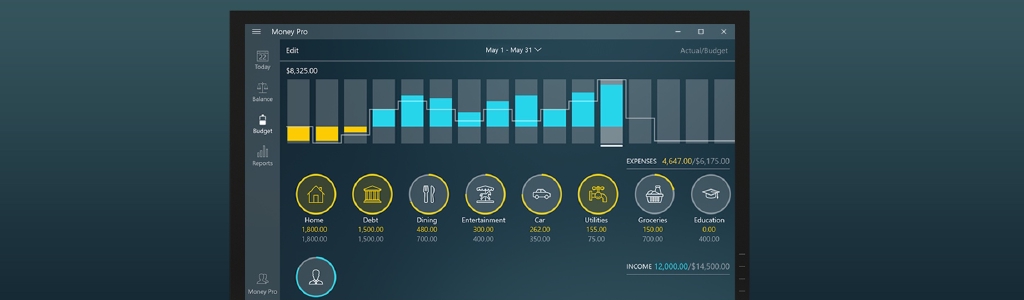
7. Transactions and Budget: rearranged to be simpler and .. more beautiful. We’ve installed intuitively desired bars, which indicate how you’ve progressed with all the budget categories. Moreover, there is a big bar that relates to the entire budget. People who make budgets will love how it works now. Besides, each big category in the Budget now has a drop-down menu, and shows a chart about this particular category.

Budget-big-bar-4.0 Budget subcategory chart

8. Minor changes, which improve usability: those are related to almost anything. Upper bars, budget periodicity, filters, login screen, icons, etc.

3D-Icons-4.0 Balance-4.0

9. Last, but not least: 17 languages installed in the app, and a professional translator native to the targeted language translates for each language.

And here is a secret: we have already planned and are working on something that no other financial app has functionally; simultaneously fun and useful features, and I believe that this will be a surprise that many people will appreciate. But this is a secret surprise, and you will know later.

Well, I can share what I feel: Money 4.0 is a Gold version of a personal finance management application. It is not just another regular step forward, but it is a breakthrough among other financial apps for the iPhone. We want to make a standard on the App Store, and with this release Money 4.0 will make this standard of a financial app that combines most elegant design and high productivity, matching the best Apple’s idea of making new technologies visually appealing.

Once again, Money 4.0 is still not released, but if you buy the current edition of Money, you will update free to Money 4.0. We are still running a New Year discount by the way.

You can try a completely Free version, but please note that all these new elegant features will appear in the Free version only after Apple makes the Paid version available. So… you may trust 200.000 customers who use Money, buy it today, and enjoy the superior Gold application immediately after it appears on the App Store.

Posted in iBear Money features | Tagged , , , , , , , , , , , , | 5 Comments

-90% SALE: Merry Christmas!

bear-with-Christmas-hatIt’s been a very good week for Money, and we’ve appeared in top 5 Finance in 22 countries, including China, India, Italy, New Zealand, Russia, Spain and the United Arab Emirates (this is my shortlist of countries that from my personal experience most frequently appear in the news about the world economy).

Since we’ve been doing so well, I have proposed to give a better discount (-90% off) for the Christmas days, and I still don’t know about the consequences of this proposition. It is clear that there will be more people who want to buy the application those days, but will there be enough people to help the sales cover the difference between the lower price and the amount of downloads? I don’t know.

I’ve also changed the screenshots in iTunes. This way I believe it becomes clearer how iBear Money helps to manage all the finances.
listplan
rule4rec

What I am absolutely certain about are 2 things:

1. This is the lowest price that we have ever sold Money for;
2. We are closing this Sale immediately after the Christmas break.

So, hurry up, and buy Money now. Remember, you still can try Money Free, but I really recommend you to buy the paid version today because this is a record breaking sale for Christmas days only.

Hope for your best Christmas eve and great upcoming financial year. Prosper, and mind your personal finances!

Merry Christmas!

Posted in iBear Money events | Tagged , , , , , , , , , , , , , | Leave a comment

Christmas SALE -70% for Money 3.4.2

One week till Christmas, and the best time for Christmas gifts and Christmas SALE. We have decided to make a sale, which has never been before for Money: -70% OFF

Christmas is a special time a year for many people. Miracles happen and iBear team want to contribute to this feeling of joy and anticipation of giving. Even the most serious businessmen are ready to wear Santa’s red hats and greet their colleagues. Yesterday we already announced that Money 3.4.2 edition for Christmas was released full-packed, and the widgets, which had been previously sold as in-app purchases, were made free in it.

Christmas-Bear

Today with only 1 week left till Christmas we’ve become determined to go as far as we could now and announced the 70% discount.

Wherever you are, at home or in the office, on a business trip or already on the Christmas break, you surely will recognize that Christmas is around, and be a part of it. Today is apparently the best time to evaluate the previous financial year and think about the approaching year, and prepare the software. I recommend you buying Money today with the Christmas discount, or test Money Free first if you want to try.

But please note that it is safer to buy now before the busiest Christmas eve: follow this link to the App Store.

Posted in iBear Money events | Tagged , , , , , , , , , , , , , | Leave a comment

Money 3.4.2 edition for Christmas: in-app purchases free

Yesterday the App Store approved Money 3.4.2 with our Christmas gifts to the customers.

Money-paid-icon

Soon we are planning to release Money 4.0, which is going to be a significant milestone. I believe that this will be a financial application, which will match the best Apple’s idea: elegant design combined with high productivity and international input of 17 languages.

Christmas-giftsAs for this version of Money 3.4.2, we have released it as a special edition for Christmas, where the customers may enjoy Icon Manager, Budgeting Planner and QIF/CSV Export Manager free, as was previously announced. Finally, we’ve managed to set them free, and I believe that Christmas is the best time for that. Also, I want to point out again that we released Backup manager from in-app purchasing even earlier.

Specifically, now you have:

1. Icon Manager. This is a widget that helps you to create your own icons. You can take a photo or choose from your existing photos and images. Basically, you can upload to your device any icons that you like, and use them as your regular icons.

icon-manager

2. Budgeting planner. This unique widget analyzes your previous periods and transactions you have made, and forecasts your future income and expenses.

planner

3. QIF/CSV Export Manager. This is a tool that you can use to send reports in popular formats to your email. You can use these reports in other financial software if you need to.

export

4. Backup manager. With this manager you can create backup copies of your profiles, and save the copies on your computer, your device, etc. If anything happens with your device, you will be able to restore your financial data from the backup.

backup

Sincerely hope that all the people who use Money and who care for their personal finances, and you may be one of those people reading this post, will find it even easier and better to manage their personal finances with iBear Money. Not familiar with Money at all? Try its Free version. If you are still thinking of when you want to buy iBear Money, buy it today when Christmas is approaching: follow this link to the App Store.

Posted in iBear Money events, iBear Money features | Tagged , , , , , , , , , , , , , , , | Leave a comment

iBear company speaks to University students

iBear company yesterday, November 7, 2009, gave a presentation to IT students about iBear Money and the App Store system. Apple launched iPhone Developer University Program last fall, and since then Universities have been showing a lot of interest to the iPhone apps development.

Andrey speaking to students

The founder of the iBear company Andrey Pilyugin talked to the students about their future and about the opportunities of being an iPhone Developer, as well as about the hardships and high level of competition between the developers. He took iBear Money as an example, and mentioned how important it is to keep up with the newest trends. For over 30 updates that iBear Money had, each update had new important features, and this is the kind of path that every developer needs to follow if they want to be successful.

questions

While the University has mainly Windows computers (just as the one used for the presentation), the students were eager to learn more about Apple and iPhones, and asked questions about advantages of the iPhone OS over Windows Mobile or other platforms; asked about FinovateStartup09 where Money participated, and the Regional IT conference where Money was selected a winner. The meeting ended up with new perspectives for the University and the students.

closing-presentation

Posted in iBear Money events | Tagged , , , , , , | Leave a comment

Money wins regional IT conference

iBear Money was selected as one of the winners on a regional IT conference devoted to innovations in IT field, yesterday, October 30, 2009. The conference is called ‘Altai IT-Forum’. The conference is an important annual event for the region, and it is sponsored by such companies as CISCO, Microsoft, Xerox, HP, Intel and others. Congratulations to iBear Money, and to all the Money users, and many thanks to the Money development team.

Announcement of winners
Giving away the certificate
iBear Money rewarded with a prize

Posted in iBear Money events | Tagged , , , , , , , , , , , , , , | Leave a comment